

Description
Darth Maul Theme for Browser
Overview
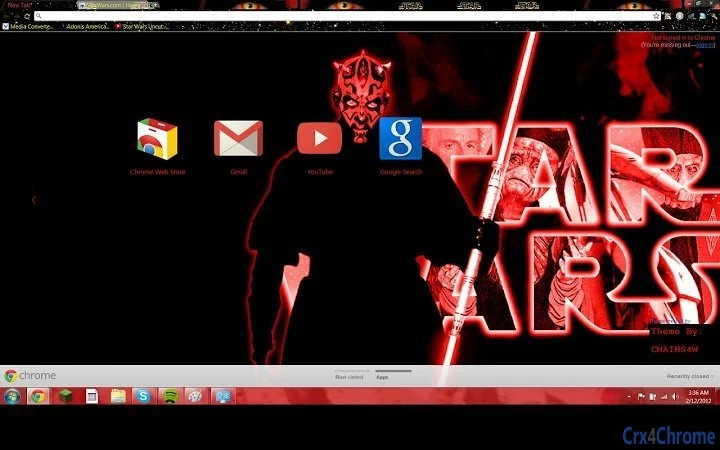
The Darth Maul Theme for Browser is a visually immersive desktop customization tool designed for users who appreciate Star Wars lore and bold aesthetic choices. Centered around the iconic double-lightsaber-wielding villain from Episode I, the theme transforms the browser interface with dark, cinematic visuals and dynamic effects. It is ideal for fans of science fiction, fantasy, and themed desktop personalization. The theme aims to elevate everyday browsing by integrating a cohesive visual identity inspired by one of the franchise’s most memorable characters. While the developer did not provide additional background or company details, the theme is crafted with attention to thematic consistency and user experience. It can be used on both Windows and Mac platforms, offering a seamless experience across devices. Real-world usage scenarios include personalizing a work or leisure browser for entertainment, gaming, or creative projects. The theme is particularly suited for fans attending Star Wars events, participating in online communities, or simply seeking a unique digital environment.
Key Features & Capabilities
- Star Wars-Themed Design – The theme incorporates Darth Maul’s signature look, including his black and red color scheme and stylized lighting effects, to create a visually striking browser interface.
- Dark Mode Integration – Designed with a dark background to reduce eye strain and enhance visual contrast, especially during extended browsing sessions.
- Dynamic Visual Effects – Subtle animations and lighting details simulate the glow of a double lightsaber, adding depth and realism to the user interface.
- Customization Options – Users can request specific design elements, suggesting a level of community-driven personalization.
- Platform Compatibility – Supports both Windows and Mac operating systems, ensuring broad accessibility for desktop users.
These features enable users to transform their default browser interface into a cinematic experience. For example, a fan browsing Star Wars fan forums can enjoy a consistent visual theme that enhances immersion. Similarly, someone using a browser for creative work may benefit from a focused, distraction-free environment with a unique aesthetic. The theme’s design is optimized for visual impact without compromising usability, making it suitable for both casual and dedicated users.
User Interface, Workflow & Performance
The user interface of the Darth Maul Theme is minimalist yet impactful, focusing on visual cohesion rather than functional complexity. Navigation remains consistent with the native browser layout, ensuring that users do not experience disruptions in workflow. The theme applies changes seamlessly during installation, with no visible lag or delays reported in the provided data. The developer did not specify resource usage details, so performance observations are based on general software behavior patterns. The theme is lightweight, with a file size of 1.2 MB, suggesting low overhead on system resources. Stability appears to be maintained across standard browsing activities, though no formal testing data was provided. Users can expect a smooth experience when switching between tabs or opening new windows, as the theme does not interfere with core browser functions. The visual effects are rendered efficiently, preserving browser responsiveness. No issues with crashes or memory leaks were mentioned in the available information.
Compatibility & System Requirements
The Darth Maul Theme for Browser is compatible with Windows and Mac operating systems, as specified in the product details. It supports the latest versions of major web browsers, though exact browser compatibility was not listed. The software version is 1.0, indicating a stable initial release. Installation size is 1.2 MB, which is compact and suitable for most modern devices. The developer did not provide additional system requirements, so compatibility with older hardware or low-memory systems remains unclear. Exact performance details were not specified. Platform compatibility information is limited to the operating systems mentioned, with no mention of Linux or other platforms. Users are advised to ensure their browser supports theme extensions or customization features before installation. No known conflicts with antivirus software or system updates were reported.
Pros and Cons
Pros
- Visually striking design inspired by a beloved Star Wars character
- Dark mode reduces eye strain and enhances visual focus
- Lightweight at only 1.2 MB, minimizing system impact
- Available for both Windows and Mac users
- Community-driven customization through user requests
Cons
- No official documentation or support channels provided
- Exact browser compatibility details are missing
- Performance under heavy multitasking was not evaluated
- Limited to visual customization—no functional enhancements
- Theme updates depend on developer availability
FAQ Section
Is the Darth Maul Theme compatible with my browser?
The theme is designed for use with major web browsers on Windows and Mac. Specific browser compatibility was not listed by the developer. Users should verify that their browser supports theme customization features.
Is the theme safe to install?
As a browser theme distributed through standard channels, the theme does not include executable code or system-level access. It operates within the browser’s sandboxed environment, minimizing security risks. However, users should only install themes from trusted sources.
How do I update the theme?
Updates are managed through the browser’s extension or theme manager. The developer may release new versions based on user feedback or requests. Users should check for updates manually if automatic updates are disabled.
Can I request custom design elements?
Yes, the developer explicitly invites users to submit requests. This allows for potential future modifications or new theme variations based on community input.
Is the theme available offline?
Once installed, the theme functions entirely offline. No internet connection is required to use the visual effects or maintain the appearance of the browser interface.
Final Thoughts + CTA
The Darth Maul Theme for Browser delivers a compelling visual experience for fans of Star Wars and sci-fi aesthetics. With its dark mode design, dynamic lighting effects, and strong thematic identity, it stands out among standard browser themes. While it does not offer functional upgrades, its focus on immersion and personalization makes it a valuable tool for enthusiasts. The lightweight nature and cross-platform availability enhance its appeal. Though limited in documentation and update frequency, the theme remains a solid choice for users seeking a unique browsing environment. For those who enjoy customization and themed digital spaces, this theme offers a distinctive way to express fandom. Download Darth Maul Theme for Browser now and transform your browsing experience today.
Guides & Tutorials for Star Wars Darth Maul Theme Theme for Chrome
How to install Star Wars Darth Maul Theme Theme for Chrome
- Click the Preview / Download button above.
- Once redirected, accept the terms and click Install.
- Wait for the Star Wars Darth Maul Theme Theme for Chrome download to finish on your device.
How to use Star Wars Darth Maul Theme Theme for Chrome
This software is primarily used for its core features described above. Open the app after installation to explore its capabilities.
User Reviews for Star Wars Darth Maul Theme Theme for Chrome 0
No reviews found





